Shape the hit.
Drive the input into compression. Set the attack and release, then choose 4:1, 8:1, 12:1 or 20:1. ALL engages the separate all-buttons model for a more aggressive response.
FET COMPRESSOR PLUGIN
Catch the peaks.
Keep the character.
Fast, assertive compression for drums, bass, vocals and synths. Shape the transient, dial in analogue colour and blend the energy back into your track.
Explore the compressor ↓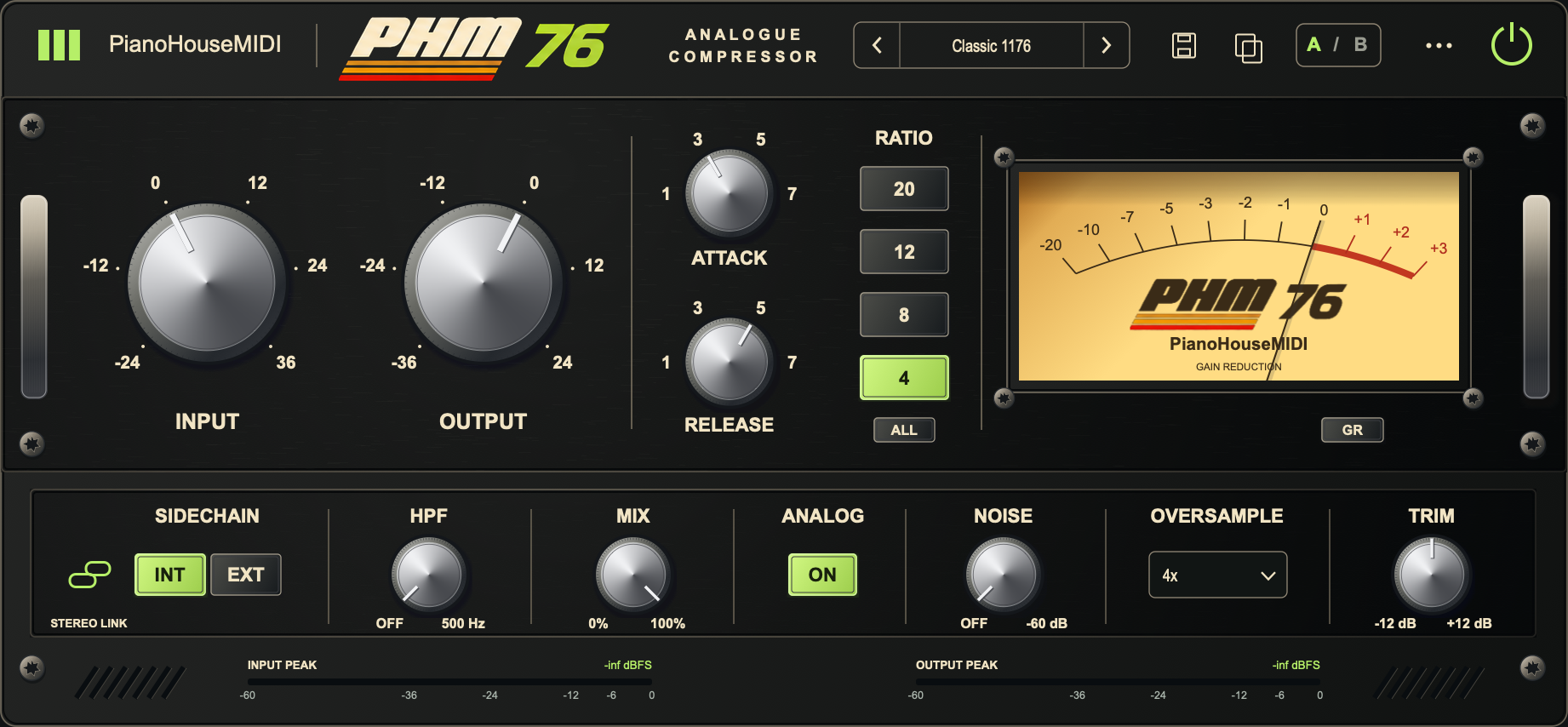
Drive the input into compression. Set the attack and release, then choose 4:1, 8:1, 12:1 or 20:1. ALL engages the separate all-buttons model for a more aggressive response.
Switch analogue colour on for amplifier and FET-style saturation. Keep compression active with colour off, or use the mix knob to blend compressed and dry audio.
Choose internal or external sidechain detection. Filter the detector up to 500 Hz to reduce low-frequency triggering, and link stereo channels when you want shared gain reduction.
THE DETAILS THAT MATTER
Switch the VU meter between gain reduction, input and output. Check peak levels at the bottom, compare A/B settings and save your own presets.
Mac: macOS 11 or later on Apple Silicon or Intel. Close your DAW and run the installer to add the AU and VST3 versions.
Windows: 64-bit Windows 10 or 11 on Intel or AMD. Extract the ZIP and copy the complete PHM 76.vst3 folder to C:\Program Files\Common Files\VST3.
Reopen your DAW, rescan plugins and load PHM 76 as an audio effect under PianoHouseMIDI. The Mac installer is unsigned and has not been Apple-notarised. Contact support for installation help.
£9.99 is one payment for PHM 76 on Mac and Windows. You may use it in personal and commercial music productions. Your music remains yours. Redistribution of the plugin is prohibited.
Downloads are linked to the purchasing account. Check the installation and signing details above before purchase. Contact support for questions about installation, purchases or refunds. Your statutory rights are unaffected.
PHM 76 is an original FET-style compressor inspired by classic fast compression. It has not been calibrated against a specific hardware unit, and we do not claim an exact hardware match. It is not affiliated with or endorsed by Universal Audio or Waves.
Yes. The plugin has internal and external detector modes. Choose EXT and route a signal from your DAW to trigger compression from another track. The HPF changes the detector response without filtering the main audio.
No. It controls the analogue colour stages. Compression remains active when colour is off; use the power button to bypass the effect.
Buy PHM 76 for £9.99 once, or sign in with All Access to download it. Both options include the Mac and Windows builds.