Find your bounce.
Start in Sync and follow your DAW tempo. Shape the depth and hold, or switch to your kick as an external sidechain trigger.
SIDECHAIN & VOLUME SHAPER PLUGIN
Your kick hits. Everything else ducks.
Shape smooth sidechain movement or chop your sound into a rhythmic glitch. Duck Norris pecks with the triggers while the waveform stays in clear view.
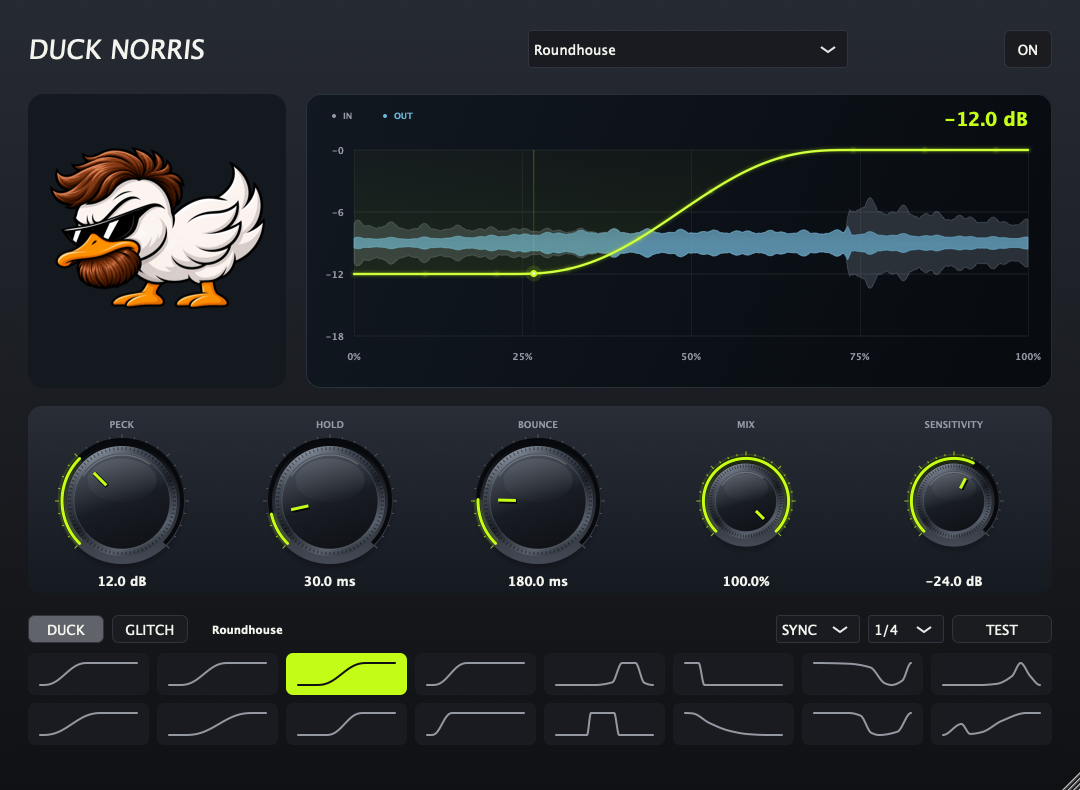
Start in Sync and follow your DAW tempo. Shape the depth and hold, or switch to your kick as an external sidechain trigger.
Pick from 16 ducking curves and four rhythmic gate presets: Stutter, Ratchet, Triplet and Broken Beak.
Input and output waveforms, a smooth gain curve and a live reduction meter. The animated duck stays beside the graph.
This is an early-access Mac build. It supports Apple Silicon (M-series) Macs and VST3 hosts. Windows, Intel Mac and Audio Unit/Logic versions are not included in this download. The glitch presets shape volume; they do not repeat or pitch-shift recorded audio.
The build is locally signed but not Apple-notarized. macOS may require approval before loading it. Contact support if your Mac blocks it or your DAW cannot scan it.
~/Library/Audio/Plug-Ins/VST3/.£4.99 is one payment for the current Mac VST3 early-access build. There is no renewal or subscription. You may use the plugin in your own personal and commercial music productions. Your music remains yours; the plugin binary may not be resold or redistributed.
Downloads are linked to the purchasing account. Check the compatibility information above before purchase. Contact support for installation problems, purchase questions or refund requests. Your statutory rights are unaffected. See the privacy notice.